About Us
Welcome to SfdcIndia, where we specialize in empowering professionals with cutting-edge SfdcIndia training.
Contact nowContact Info
- CV Complex,
Above Bata Showroom,
Hastinapuram, BN Reddy,
Hyderabad, Telangana 500079. - +91-7097777111
- info@sfdcindia.com
Welcome to SfdcIndia
Salesforce Headless 360
Salesforce Headless 360
Salesforce Latest Update
Salesforce Headless 360
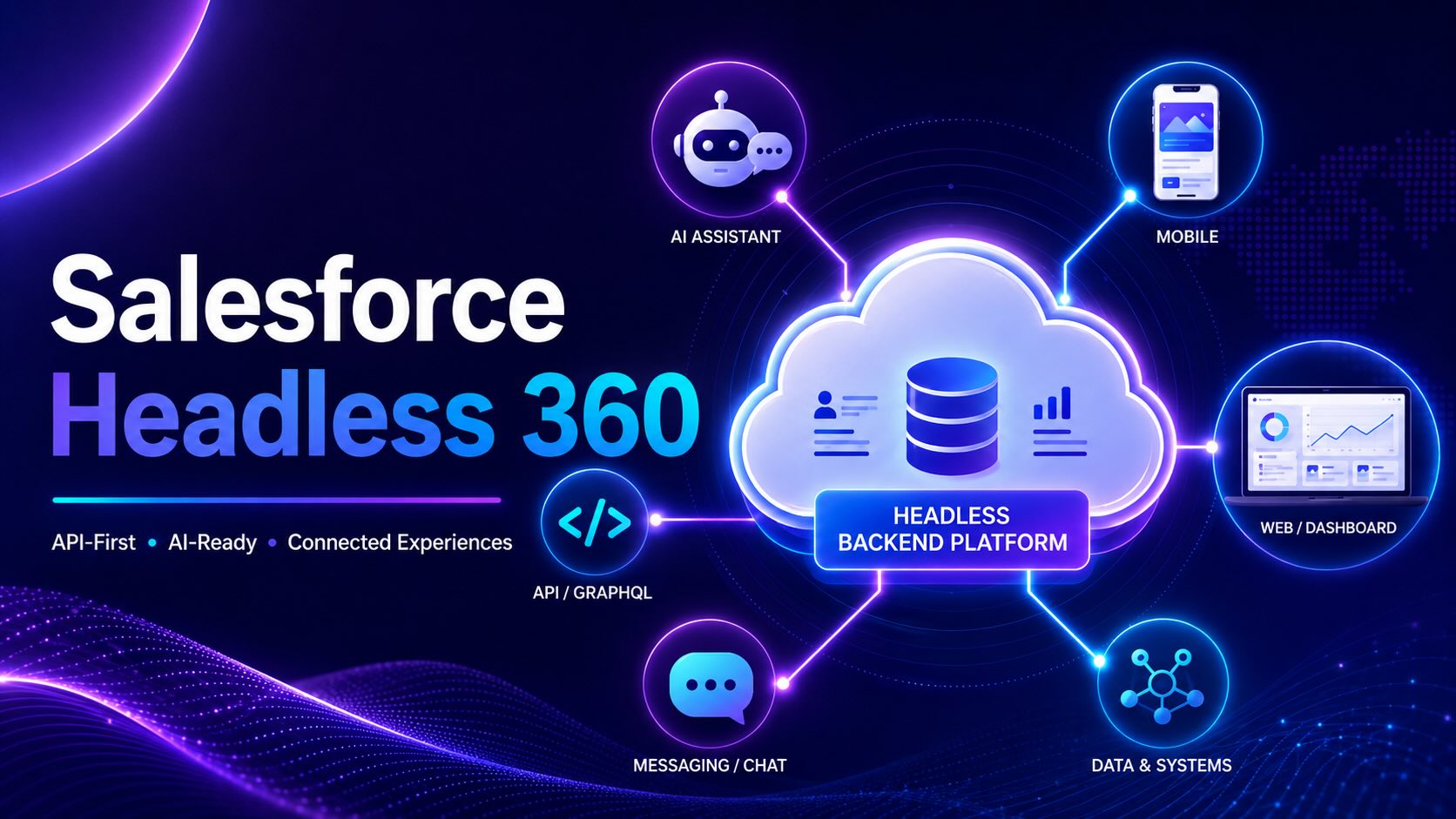
Simple Meaning: Headless 360 allows users, applications and AI agents to use Salesforce data, automation and business logic without depending on the standard Lightning interface.
01What Is Headless 360?
- Separates the Salesforce frontend from Salesforce data, automation, metadata and business logic.
- Salesforce acts as the secure backend platform.
- External applications connect through APIs, MCP tools, CLI and Agentforce services.
- Supports websites, mobile apps, Slack, AI assistants, voice apps and developer tools.
- Does not replace Lightning Experience.
- It is an architecture, not a separate Salesforce Cloud.
External App or AI Agent → API / MCP / CLI → Salesforce Data, Security and Automation
02Why Salesforce Introduced Headless 360
- AI agents work through APIs and tools instead of clicking Salesforce pages.
- Salesforce capabilities can be used inside external applications.
- Existing Flows, Apex, validation rules, permissions and data models can be reused.
- Users can work from the tools they already use.
- Developers can build custom experiences without rebuilding the Salesforce backend.
- Supports Salesforce's Agentic Enterprise strategy.
03When Was Headless 360 Introduced?
- April 15, 2026: Salesforce publicly introduced the Headless 360 architecture.
- July 2026: Salesforce released the dedicated Headless 360 MCP Server in Beta.
- The MCP Server is still a Beta capability and may change in future releases.
04Where Headless 360 Is Used
- Custom websites and customer portals
- Mobile applications
- Slack and collaboration tools
- AI assistants and MCP-compatible clients
- Developer tools such as VS Code and supported AI coding environments
- Voice and messaging applications
- Partner portals
- Event-driven integrations and external systems
05Headless 360 Setup
Activate the MCP Server Setup → API Catalog → MCP Servers → Salesforce Servers → Headless 360 → Activate.
Create an External Client App Setup → External Client App Manager → New External Client App.
Enable OAuth Add the callback URL provided by the MCP-compatible client.
Add OAuth Scopes Add Perform Requests at Any Time and Access Salesforce Hosted MCP Servers — mcp_api.
Enable Security Configure PKCE and JWT-based access tokens where required.
Connect the MCP Client Use the Consumer Key as the OAuth Client ID and authenticate with Salesforce.
Assign Permissions Verify object access, Field-Level Security, record sharing, Apex access and permission sets.
Test Read-Only First Start with a simple query before allowing update or deployment operations.
Important: Headless 360 setup depends on the use case. API, CLI, Agentforce and custom application implementations may use different configuration steps.
06Real-Time Uses
- Summarize Accounts, Contacts, Opportunities and Cases from an AI assistant.
- Update Salesforce records directly from Slack or another external application.
- Freeze users and assign permission sets through approved administration tools.
- Generate, review and deploy Apex from supported developer tools.
- Create Platform Events, Change Data Capture and Event Relay configurations.
- Build mobile apps using Salesforce as the backend.
- Create custom partner and customer portals.
- Approve discounts, refunds and requests from conversational interfaces.
07Common Headless 360 Errors
| Error | Main Reason | Solution |
|---|---|---|
| ⚠ Headless 360 not visible | Unsupported org, Beta availability or insufficient permission | Check API Catalog, org support and Setup permissions |
| ⚠ invalid_client_id | Wrong Consumer Key or app not activated | Use the correct Consumer Key and reconnect |
| ⚠ INVALID_AUTH_HEADER | JWT access tokens are not enabled | Enable JWT-based access tokens |
| ⚠ Callback URL error | Callback URL mismatch | Use the exact URL provided by the client |
| ⚠ Missing mcp_api scope | Hosted MCP scope not added | Add the mcp_api OAuth scope |
| ⚠ Insufficient access | Missing object, field or record access | Review permissions and sharing |
| ⚠ No records returned | User cannot access records or wrong org connected | Verify user access and connected org |
| ⚠ Skill not available | Operation not supported in the current Beta | Use APIs, CLI or custom development |
| ⚠ Flow or Apex error | Validation, automation or governor limit failure | Review logs, required fields and automation |
08Best Practices
- Start in a Developer org or sandbox.
- Use least-privilege permissions.
- Begin with read-only operations.
- Require approval for delete, deployment and permission changes.
- Use clear and specific prompts.
- Review generated Apex and metadata before deployment.
- Monitor agent activity and OAuth sessions.
- Maintain clean data and clear field descriptions.
- Protect Consumer Keys and authentication settings.
- Prepare backup and rollback plans.
09Limitations
- The dedicated Headless 360 MCP Server is currently in Beta.
- Not every Salesforce capability is available as an MCP skill.
- Governor limits, validation rules and sharing rules still apply.
- Some use cases still require Apex, Flow, APIs or middleware.
- Headless 360 does not automatically create a frontend.
- AI results depend on prompt clarity, metadata quality and user permissions.
Final Definition
Salesforce Headless 360 allows users, applications and AI agents to securely access Salesforce data, automation and business logic through APIs, MCP tools, CLI and external interfaces without depending on the standard Salesforce Lightning UI.